Showing posts with label 75. Show all posts
Showing posts with label 75. Show all posts
Sunday, August 28, 2016
Free Image Optimizer Reduce Image Size Up To 75
Free Image Optimizer Reduce Image Size Up To 75
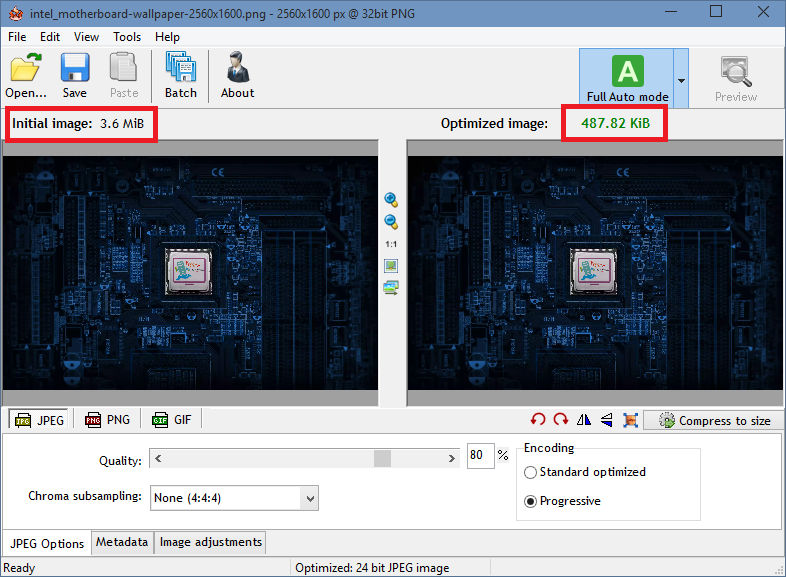
Radical Image Optimization Tool (RIOT for short) is a free image optimizer that will let you to visually adjust compression parameters while keeping minimum filesize. It uses with a side by side (dual view) or single view interface to compare the original with the optimized image in real time and instantly see the resulting file size.
It is lightweight, fast and simple to use, yet powerful for advanced users. You will be able to control compression, number of colors, metadata settings and much more, and select image format (JPG, GIF or PNG) for your output file.
Download
Portable
- Main features
? open many image types including rare/scientific types
? save and optimize JPEG, GIF and PNG with a simple, clean user interface
? automatic optimization selects the most suitable format and parameters
? works in dual view: (original – optimized image) or single view (optimized image).
? automatic preview of resulting image
? in-place compare function (alternativelly display the original image over the optimized image to notice small pixel changes)
? compress files to desired filesize threshold
? fast processing (all is done in memory);
? see instant results including resulting filesize
? batch support (process multiple files at once)
? transparency handling options
? decide if you want to keep metadata (comments, IPTC, Adobe XMP, EXIF profiles, ICC profiles).
? Unsupported metadata is removed
? transfer metadata between image formats (destination format must support them)
? common tools: pan and zoom, rotate, flip
? basic image adjustments: brightness, contrast, gamma, invert
? visually reduce number of unique colors for PNG and GIF images in order to reduce filesize
? (two quantization methods are available: Xiaolin Wu and NeuQuant neural net)
? resize image by using well known resample filters (ex: Lanczos3, Catmull Rom, Bicubic, and others)
? out-of-the-box support for external PNG optimizers (optipng, pngout, etc)
? the compression and the results are comparable to those of commercial products, even higher.
? Adaptive logarithmic tone mapping algorithm (Drago) used for HDR images
Input image types
• common bitmap images as well as Adobe Photoshop PSD files
• popular HDR formats and RAW camera images
• rare/scientific types (up to 128 bpp, integer and floating point)
Source:
Source:

Wednesday, August 17, 2016
Google Chrome terbaru April 2016 versi 50 0 2661 75
Google Chrome terbaru April 2016 versi 50 0 2661 75

Google Chrome is a fast, free, simple, and secure web browser, built for the modern web. Google Chrome is working under Windows 8/7/Vista/XP and available for Windows RT. Chrome 37 adds support for DirectWrite, an API on Windows for clear, high-quality text rendering even on high DPI displays. Before DirectWrite, Chrome used the Graphics Device Interface (GDI) to render text. GDI dates back to the mid-80’s and reflects the engineering tradeoffs of that time, particularly for slower, lower-resolution machines. The switch to DirectWrite has been a top user request for years, and required extensive re-architecting and streamlining of Chrome’s font rendering engine.
Features:
Speed
Chrome is designed to be fast in every possible way. It’s quick to start up from your desktop, loads web pages in a snap, and runs complex web applications lightning fast.
Simplicity
Chrome’s browser window is streamlined, clean and simple. For example, you can search and navigate from the same box and arrange tabs however you wish — quickly and easily.
Security
Chrome is designed to keep you safer and more secure on the web with built-in malware and phishing protection, auto-updates to make sure you have all the latest security fixes, and more.
Privacy
Chrome puts you in control of your private information while helping protect the information you share when you’re online.
Customization
There are tons of ways to customize Chrome and make it yours. It’s easy to tweak your settings and add apps, extensions, and themes from the Chrome Web Store.
Signing In
Signing in to Chrome brings your bookmarks, history, and other settings to all your computers. It also automatically signs you in to all your favorite Google services.
Google Chrome Changelog:
Homepage – http://www.google.com/chrome/
Screenshot :

Download Google Chrome Stable for Windows 32bit | 44,75 MB |
Download Google Chrome Stable for Windows 64bit | 51,16 MB |
Download Google Chrome Stable for Windows XP ( Stopped support in news version : Chrome Blog ) :
Download Google Chrome Stable for Windows XP 32bit | 42,75 MB |
Download Google Chrome Stable for Windows XP 64bit | 48,85 MB |
Download Google Chrome Enterprise | MSI |
Download Google Chrome Stable for Mac | 64,58 MB |
Download Google Chrome Portable
Download Google Chrome Stable for Linux
64 bit .deb (Untuk Debian/Ubuntu) | 46,12 MB |
64 bit .rpm (Untuk Fedora/openSUSE) | 46,18 MB |
Download Chrome Privacy Protector
Download Google Chrome for Android
Download Google Chrome for iPhone dan iPad
Monday, August 15, 2016
Download Realtek High Definition Audio 2 75
Download Realtek High Definition Audio 2 75

Fitur:
- Berdasarkan WaveRT Driver fungsi audio untuk Windows Vista
- Direct Sound 3D yang kompatibel
- Band multi equalizer perangkat lunak dan alat yang disediakan
- Mikrofon Acoustic Echo Cancellation (AEC), Kebisingan Penindasan (NS), dan Beam Pembentukan (BF) teknologi untuk aplikasi suara
- Perangkat lunak ini memerlukan versi 32-bit dari Windows Vista atau Windows 7.
Download: Realtek High Definition Audio 2.75
Subscribe to:
Posts (Atom)