Showing posts with label up. Show all posts
Showing posts with label up. Show all posts
Sunday, August 28, 2016
Free Image Optimizer Reduce Image Size Up To 75
Free Image Optimizer Reduce Image Size Up To 75
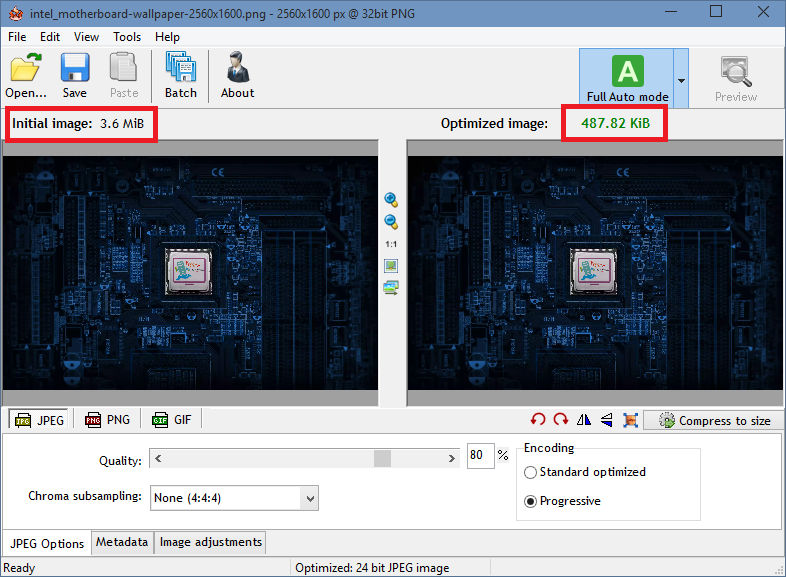
Radical Image Optimization Tool (RIOT for short) is a free image optimizer that will let you to visually adjust compression parameters while keeping minimum filesize. It uses with a side by side (dual view) or single view interface to compare the original with the optimized image in real time and instantly see the resulting file size.
It is lightweight, fast and simple to use, yet powerful for advanced users. You will be able to control compression, number of colors, metadata settings and much more, and select image format (JPG, GIF or PNG) for your output file.
Download
Portable
- Main features
? open many image types including rare/scientific types
? save and optimize JPEG, GIF and PNG with a simple, clean user interface
? automatic optimization selects the most suitable format and parameters
? works in dual view: (original – optimized image) or single view (optimized image).
? automatic preview of resulting image
? in-place compare function (alternativelly display the original image over the optimized image to notice small pixel changes)
? compress files to desired filesize threshold
? fast processing (all is done in memory);
? see instant results including resulting filesize
? batch support (process multiple files at once)
? transparency handling options
? decide if you want to keep metadata (comments, IPTC, Adobe XMP, EXIF profiles, ICC profiles).
? Unsupported metadata is removed
? transfer metadata between image formats (destination format must support them)
? common tools: pan and zoom, rotate, flip
? basic image adjustments: brightness, contrast, gamma, invert
? visually reduce number of unique colors for PNG and GIF images in order to reduce filesize
? (two quantization methods are available: Xiaolin Wu and NeuQuant neural net)
? resize image by using well known resample filters (ex: Lanczos3, Catmull Rom, Bicubic, and others)
? out-of-the-box support for external PNG optimizers (optipng, pngout, etc)
? the compression and the results are comparable to those of commercial products, even higher.
? Adaptive logarithmic tone mapping algorithm (Drago) used for HDR images
Input image types
• common bitmap images as well as Adobe Photoshop PSD files
• popular HDR formats and RAW camera images
• rare/scientific types (up to 128 bpp, integer and floating point)
Source:
Source:

Thursday, August 25, 2016
IObit Driver Booster V2 4 Make Your Drivers Up To Date
IObit Driver Booster V2 4 Make Your Drivers Up To Date

IObit Driver Booster
Driver Booster is a lightweight software application whose purpose is to help you manage outdated drivers for all your devices. It protects your PC from hardware failures, conflicts, and resolves system crash problems caused by outdated drivers. All old drivers can be detected by simply clicking on the “Scan” button, and then you just need to click “Update All” button to refresh these outdated drivers. Compared with other driver updating tools, IObit Driver Booster can improve your PC performance for gaming as well.
- Features
• Automatically Identify Outdated Drivers
• Download and Update Outdated Drivers with One Click
• Unlock Driver Update Speed Limit
• Specialized Driver Tweaking for Better Gaming Experience
• Support More Comprehensive Hardware Devices
• Enjoy Priority to Update Outdated Drivers Promptly
• Backup Drivers for Safe Restore
• Enhance Hardware Functionality for Better Performance
• Automatically Update to the Latest Version
Download Trial
Medicine (K-E-Y)

Sunday, August 21, 2016
Fitur Scurity Check Up Sudah Bisa dirasakan di Aplikasi Facebook Android
Fitur Scurity Check Up Sudah Bisa dirasakan di Aplikasi Facebook Android

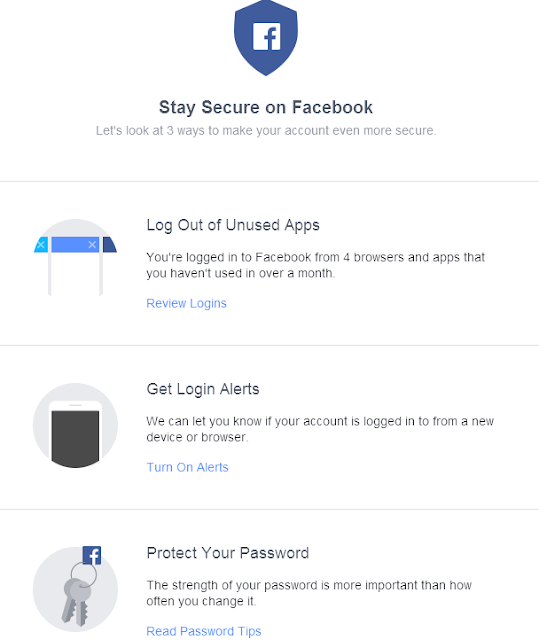
Teknopoin.com - Kini raksasa sosial media di dunia sekarang sudah menerapkan fitur Checkup Facebook, sehingga mempermudah pengguna untuk logout dari beberapa browser dan juga dengan peragkat. Sekarang fitur tersebut sudah bisa dirasakan bagi pengguna Android tepatnya pada aplikasi Facebook di Android.
Semenjak adanya Security Checkup pada pertengan tahun 2015 lalu, fitur ini sudah banyak pengguna meresponnya dengan hasil yang positif tentu dari berbagai kalangan pengguna Facebook di dunia ini. Pengguna sudah banyak mengungkapkan denga hadirnya Security Checkup di Facebook, kini sangat bernilai lebih, untuk mempermudah perlindungan lebih dari pada akun Facebook yang mereka punya.
Disamping bisa logout dari berbagai browser dan juga dengan perangkat yang sudah tidak digunakan lagi, Kamu juga bisa menggunakan fitur Login Alert. Fitur tersebut berguna untuk memberitahu Kamu jika akun Facebook pribadi Kamu sedang login di browser atau perangkat baru.
Cara Menggunakan fitur Security Chekcup Facebook
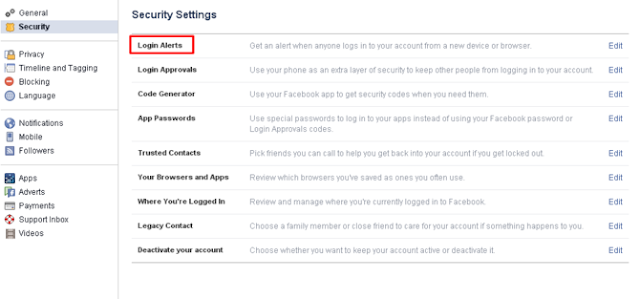
Untuk cara menggunakanya adalah, Kamu bisa dengan mudah dengan mengatur pada bagian pengaturan (setting) Facebook. Disini Kamu bisa mengatur fitur-fiturnya diantaranya Login Alert, Login Approvals, sampai Kamu bisa membuat password spesial agar tidak ada yang sembarangan dapat mengutak-atik akun tersebut. Dengan begitu keamanan akun Kamu akan tetap terjaga.
Facebook menghadirkan fitur tersebut karena lebih peduli kepada pengguna dari segi keamanan akun pribadinya sendiri dan tidak harus menunggu sesuatu hal buruk akan terjadi.
Bagaimana pendapatmu dengan adanya fitur ini ? berikan komentar Kamu dikolom komentar dibawah ini dengan bijak tentunya. Terimakasih telah berkunjung, semoga bermanfaat.
Thursday, August 4, 2016
Speed Up Your Computers Start Up WinPatrol Plus
Speed Up Your Computers Start Up WinPatrol Plus

WinPatrol monitors and exposes adware, keyloggers, spyware, worms, cookies, and other malicious software. This program puts you back in control of your computer with no need for constant updates. WinPatrol’s goal is to help you understand what programs are running on your computer and to alert you to any new programs added without your permission. Unlike traditional security programs, WinPatrol doesn’t scan your hard drive searching for previously identified threats. Instead, it uses a heuristic behavioral approach, taking a snapshot of your critical system resources, and then alerting you to any changes that occur without your knowledge.

Speed-up your computers start-up by moving programs you don’t need right away to delayed start.
Delay program start-up by up to 1 hour 59 minutes
Lock down important registry keys
View information about programs on your computer via our PLUS Info… feature
Detect malware BEFORE you get infected.
Take control of Internet Explorer add-ons and toolbars
Pro-actively remove unwanted cookies
On demand heuristic processing
Control ActiveX components
All Features
• Detect and Review New Auto-Startup Programs
• Alerted you to New Browser Add-Ons like BHOs and Tool Bars
• Alerts you to newly installed Window Services
• Alerts you to creation of Scheduled Tasks
• Alerts you and Locks Changes to File Type Associations
• Alerts you to newly registered ActiveX components
• Alerts you to changes in IE Home and Search pages
• Alerts you to changes in the Windows HOST File
• Lets you know if your AutoUpdate or UAC settings change
• Add/Remove and Review Auto-Startup Programs
• Automatically Disable Reoccuring Startup Programs
• Delay Auto-Startup programs for quick bootup
• Review and Remove unwanted Scheduled Tasks
• Remove Unwanted Browser Add-Ons like BHOs and Tool Bars
• Review, Display and Kill Multiple Running Tasks with a single click
• Review, Stop and Control Window Services
• Manage and Automatically Remove Unwanted Cookies
• Review and Edit your Windows HOST File
• Review and Remove Hidden Files
• Track Date/Time when programs are first detected on your system
• Multiple System Report Options
• Access to WinPatrol PLUS Knowledgebase (24/7)
• Real-time Infiltration Detection
• Increased PLUS Performance
• Automatically respond and/hide specific alerts.
• Review and Remove ActiveX components
• Custom Registry Monitoring and Reg Locking
• Access to WinPatrol Cloud results

Wednesday, August 3, 2016
Reduce Data Usage Up To 50 In Chrome
Reduce Data Usage Up To 50 In Chrome

If you are using Google Chrome for web browsing already, you might already know about Chrome plugins and extensions that you can install to enhance your experience. Often these extensions or plugins are add-ons which offer a variety of additional features that allow us to do more with Chrome. However, when we add a new extension it usually takes away from our performance based on the simple logic that the more features we add the more load we generate for them to work. As a result, you might find the Google Chrome browser not as fast as it once was.
Google now offers an official plugin made by them called the Data Saver extension. Whenever you have something that’s made by the folks out of Mountain View you are usually in pretty good hands. Correspondingly, only Google have the ability to create this tool because it works with their servers. Once you have the Data Saver extension installed, it creates a connection between your computer and one of the servers running in Google’s data centers to help enhance your browsing experience. Here’s how you can benefit by using the new extension:
How to cut a data usage and optimize pages in GOOGLE CHROME (PC)
- the Google Chrome browser if you haven’t got it already.
- the data saver extension for the Google Chrome browser.
- – this is currently in beta stages since it’s new. It will eventually see the full release, or at least it has an excellent chance of seeing it because it’s made by Google.
- Click the blue button to start the Data Saver installation.

- It will automatically appear in the top right side of the browser menu after it’s done.
- You can click the icon available to toggle the data saver on and off when you desire.
- Do note that Chrome’s Data Saver (Beta) extension supports Windows and Mac platforms. It can also enable in Chrome IOS and Android.
 |
| This is mine... |

On Android
• Touch the Chrome menu, then Settings.• Under "Advanced," touch Data Saver.
• Slide the switch ON. You can switch this off at any time.
On iOS
• Touch the Chrome menu, then Settings.
• Under “Advanced,” go to Bandwidth > Data Saver.
• Slide the switch ON. You can switch this off at any time.
Safe Browsing with Data Saver
On Android and iOS, when Data Saver is enabled, Chrome uses Safe Browsing technology to protect you from malware and phishing attacks. Chrome will warn you if youre about to visit a dangerous site.
Subscribe to:
Posts (Atom)