Showing posts with label image. Show all posts
Showing posts with label image. Show all posts
Sunday, August 28, 2016
Free Image Optimizer Reduce Image Size Up To 75
Free Image Optimizer Reduce Image Size Up To 75
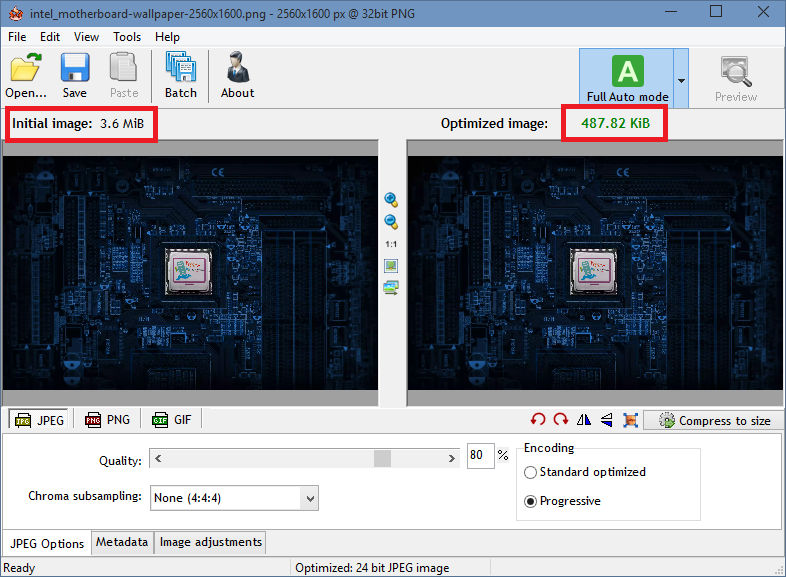
Radical Image Optimization Tool (RIOT for short) is a free image optimizer that will let you to visually adjust compression parameters while keeping minimum filesize. It uses with a side by side (dual view) or single view interface to compare the original with the optimized image in real time and instantly see the resulting file size.
It is lightweight, fast and simple to use, yet powerful for advanced users. You will be able to control compression, number of colors, metadata settings and much more, and select image format (JPG, GIF or PNG) for your output file.
Download
Portable
- Main features
? open many image types including rare/scientific types
? save and optimize JPEG, GIF and PNG with a simple, clean user interface
? automatic optimization selects the most suitable format and parameters
? works in dual view: (original – optimized image) or single view (optimized image).
? automatic preview of resulting image
? in-place compare function (alternativelly display the original image over the optimized image to notice small pixel changes)
? compress files to desired filesize threshold
? fast processing (all is done in memory);
? see instant results including resulting filesize
? batch support (process multiple files at once)
? transparency handling options
? decide if you want to keep metadata (comments, IPTC, Adobe XMP, EXIF profiles, ICC profiles).
? Unsupported metadata is removed
? transfer metadata between image formats (destination format must support them)
? common tools: pan and zoom, rotate, flip
? basic image adjustments: brightness, contrast, gamma, invert
? visually reduce number of unique colors for PNG and GIF images in order to reduce filesize
? (two quantization methods are available: Xiaolin Wu and NeuQuant neural net)
? resize image by using well known resample filters (ex: Lanczos3, Catmull Rom, Bicubic, and others)
? out-of-the-box support for external PNG optimizers (optipng, pngout, etc)
? the compression and the results are comparable to those of commercial products, even higher.
? Adaptive logarithmic tone mapping algorithm (Drago) used for HDR images
Input image types
• common bitmap images as well as Adobe Photoshop PSD files
• popular HDR formats and RAW camera images
• rare/scientific types (up to 128 bpp, integer and floating point)
Source:
Source:

Tuesday, August 23, 2016
FILEminimizer Server 8 Compress MS Office Image Files 50
FILEminimizer Server 8 Compress MS Office Image Files 50

FILEminimizer Server 8.0.0 Final
FILEminimizer Suite compresses PowerPoint, Word, Excel, PDF and Image files by 50-90% without zipping. The software sports an intuitive interface and lets you optimize the size of your Office files (97-2013), PDF documents as well as your JPG, TIF, BMP, GIF, EMF and PNG image files without changing the native file format. The optimization is visually lossless preserving the original visual quality of a file at all times. It integrates into Microsoft Office and into your email program (supports Microsoft Outlook and Lotus Notes clients) to optimize your office and image attachments directly before sending. You can easily bypass email size limitations and won’t clog up your recipient’s inbox. It relieves Microsoft Exchange and Lotus Domino email servers by 50-90% optimizing the whole email infrastructure in corporations.
Download

Sunday, August 7, 2016
Disable login screen background image
Disable login screen background image

Microsoft telah menambahkan wallpaper baru sebagai background dari Login Screen pada Windows 10. Pada artikel kali ini saya akan membahas bagaimana menonaktifkan fitur tampilan background pada login screen windows 10 Berikut langkah – langkah:
1) Pada registry editor, cari menu key seperti dibawah iniHKEY_LOCAL_MACHINESOFTWAREPoliciesMicrosoftWindowsSystem


2) Kemudian pada ruang kosong buat new DWORD dengan cara klik kanan pada mouse. Pada key DWORD beri nama file dengan DisableLogonBackgroundImage kemudian untuk valuenya isikan dengan angka 1.

3) Untuk mengembalikan ke dalam kondisi semula, anda hanya perlu mendelete key DisableLogonBackgroundImage yang tadi sudah dibuat.
Tuesday, August 2, 2016
Light Image Resizer Resize Or Convert Any Image
Light Image Resizer Resize Or Convert Any Image

Easy but powerful, it resizes and simply converts images, one by one or in batch mode. Bulk editing can be used to apply profiles to a set of pictures.
The program is available as a windows shell extension. Just right click to easily resize pictures as copies or continue to work on the original photos. Then share your resized photos online with friends. It’s freeware software for personal use.
Download
- Features
• Resize pictures, resize photos and resize images – compress, convert, and easily create copies of your pictures
• A fast batch photo resizer
• High quality results using ultra fast multi-core, photo resize technology
• High quality image resizing filters – Lanczos and Bicubic for best
• compression quality, and Linear for speed
• Create e-mail friendly images or use them for internet publishing
• Sort, rename or add a watermark to protect your pictures from being stolen
• Use the profiles library – iPhone, iPad mini, forum, HQ
• New – create custom PDF pages !
• Easy to convert JPEG to PDF
 |
| Screenshot |
 |
| Screenshot |
Subscribe to:
Posts (Atom)